Context engineering for code agents is the practice of deciding what enters the prompt, what stays out, and what is retrieved only when an agentic loop needs it. The short answer: do not hand the whole repository to the agent. Give it a clear spec, traceable clues, verification commands and tools to fetch the rest.
In 2025, the Stack Overflow Developer Survey reported that 84% of respondents use or plan to use AI in development, up from 76% the previous year (Stack Overflow, Developer Survey 2025 AI, accessed 2026-07-01). That adoption makes context control an engineering practice, not prompt decoration.
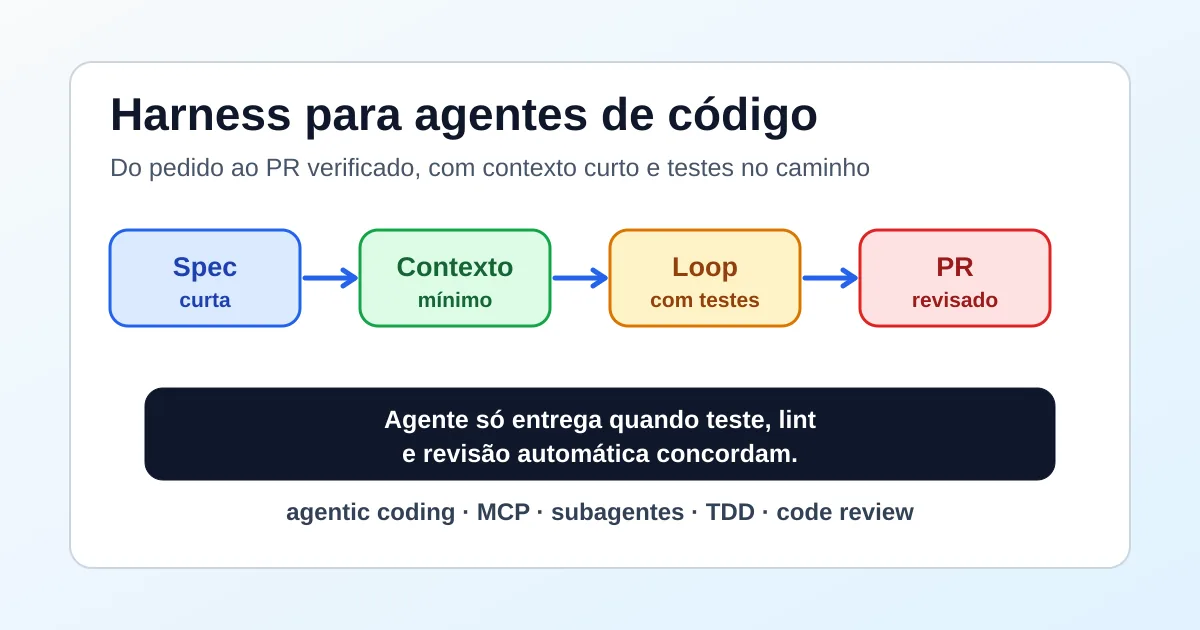
This article follows the code-agent harness before PR review. The harness decides when the agent can deliver. Context engineering decides what the agent should know before it starts, during investigation and before it opens the pull request.
Versions of this article: Portuguese and Spanish. For author context, see the about page. For editorial contact, use contact.
Practical TL;DR
- With 84% AI use or planned use, context is now an engineering bottleneck.
- Start agents with spec, likely files, contracts and commands, not a repo dump.
- Subagents, MCP and codebase RAG help when they delay reading until it matters.

What is context engineering for code agents?
In 2025, 51% of professional developers said they use AI tools daily (Stack Overflow, Developer Survey 2025 AI, accessed 2026-07-01). Context engineering is the operating answer to that frequency: create a work window that helps the agent decide, edit and verify without flooding the conversation.
The common mistake is treating context as volume. More files do not mean more understanding. An agent can read many snippets and still miss the contract that mattered: the route that must not break, the queue that needs idempotency, the migration that needs rollback or the test that represents real behavior.
Good context has a job. It reduces uncertainty before the first edit, shows where to search when a question appears and preserves evidence for review. If a snippet does not change one of those decisions, it probably should not enter the start of the loop.
In short, context engineering for code agents turns a large repository into a navigable path. Stack Overflow reported 51% daily AI use among professional developers in 2025 (Stack Overflow, accessed 2026-07-01), so the advantage is not only the model. It is what the agent receives, what it can retrieve and what it must prove before delivery.
Why does too much context hurt agentic coding?
Anthropic describes a shift toward "just in time" context strategies, where agents keep lightweight identifiers such as file paths and saved queries, then load data at runtime through tools (Anthropic, Effective context engineering for AI agents, accessed 2026-07-01). The point is direct: useful context can be fetched when it becomes necessary.
When you stack files in the prompt too early, the agent spends attention on material it may never use. The conversation becomes harder to audit. The next iteration carries stale decisions, old logs and hypotheses that should have been discarded.

The better question is not "how much fits in the window?". It is "which information changes the next decision?". For an API fix, that usually means the contract, handler, nearby test, middleware and validation command. It rarely means old documentation, full logs, the whole changelog or generated files.
For long loops, the real saving comes from doing more work without rereading the same context. When the agent needs to investigate large codebases or keep agentic loops moving, an author-owned tool like RemoteCode for helping Claude Code and Codex go further with less context waste can help, as long as the final decision still sits with the harness and CI.
How do you build the initial context before the first edit?
In 2025, 47.1% of all Stack Overflow respondents said they use AI daily, and 17.7% said they use it weekly (Stack Overflow, Developer Survey 2025 AI, accessed 2026-07-01). At that cadence, initial context should be a short routine, not a heavy ceremony.
Start with the spec. It should state expected behavior, out-of-scope work and acceptance criteria. Then list likely files and why they matter. Next, capture external contracts: endpoint, schema, queue event, feature flag, permission or environment variable.
Add the commands that prove the change. For backend work, that can include unit tests, integration tests, typecheck, lint and the local command that starts dependencies. For DevOps, it can be an IaC plan, policy validation, workflow test and the closest available job simulation.
| Context input | Why it enters | When to discard |
|---|---|---|
| Short spec | Defines the work contract | If it turns into product debate, refine first. |
| Likely files | Gives navigation starting points | If the agent cannot justify reading them, remove them. |
| Nearby tests | Shows expected behavior | If they do not cover the change, write or adjust them first. |
| Verification commands | Prevents delivery by appearance | If they cannot run, the PR must say why. |
| External contracts | Protects consumers | If the source does not exist, remove the claim. |
In short, initial context should fit a fast human review. Daily AI use by 47.1% of respondents in 2025 (Stack Overflow, accessed 2026-07-01) makes this routine worth standardizing. If the agent cannot name the contract, test and file behind the first edit, it is still exploring.
When do subagents preserve context?
Claude Code documentation says each subagent runs in its own context window, with a custom prompt, tool access and independent permissions, then returns results to the main conversation (Anthropic, Create custom subagents, accessed 2026-07-01). Use that when side exploration would create noise.
A subagent is not a reason to outsource everything. It works best for narrow tasks: locate relevant files, summarize logs, review a diff, compare contracts or investigate a failing test. The output should be short, evidence-backed and actionable. If it returns a large dump, the context problem moved instead of shrinking.

Use fan-out when the questions are independent. One subagent can read production logs, another can inspect a migration, and another can find related tests. The main agent decides from summaries. Do not let several subagents edit the same modules without one shared spec.
In short, subagents preserve context when they isolate exploration and return decisions. The documentation also warns that many subagents returning detailed results can consume significant context (Anthropic, Create custom subagents, accessed 2026-07-01). The response format matters as much as delegation.
Where do MCP and codebase RAG fit?
The Model Context Protocol defines MCP as an open standard for connecting AI applications to external systems, including data sources, tools and workflows (Model Context Protocol, What is MCP?, accessed 2026-07-01). In code work, that should be an access point, not a data landfill.
MCP helps when the agent needs an issue, test database, Sentry, internal docs, Figma, GitHub or another system outside the repository. The initial context should say when to use the tool and what evidence must return. It should not paste every issue, log and schema before the decision requires them.
Claude Code documentation recommends connecting MCP when you find yourself copying data from another tool into chat, such as an issue tracker or monitoring dashboard (Anthropic, Connect Claude Code to tools via MCP, accessed 2026-07-01). That is a practical test: if you paste it constantly, it may deserve a tool.
Codebase RAG follows the same rule. It helps find candidate snippets, but it does not replace directed reading. The agent still needs to explain why that file matters, what contract it found and which test protects the change.
How do Codex and Claude Code read project instructions?
Codex documentation says AGENTS.md files are concatenated from the root directory down to the current directory, and that the default limit for project instructions is 32 KiB (OpenAI, Custom instructions with AGENTS.md, accessed 2026-07-01). Instruction content also spends context budget.
Do not turn AGENTS.md into an encyclopedia. Put stable rules there: test commands, PR standards, permission limits, protected files, migration style and review criteria. Task-specific context belongs in the spec because it changes every loop.
Claude Code uses a different configuration surface, but the layering idea still holds. Durable instructions stay with the project. Ephemeral context stays with the task. External data enters through tools. Investigation results become short synthesis.
How do you verify the context before a PR?
In 2025, 58.7% of Stack Overflow respondents said they do not plan to use AI for committing and reviewing code, while 44.1% said they do not plan to use AI for testing (Stack Overflow, Developer Survey 2025 AI, accessed 2026-07-01). That skepticism is useful: context only matters when it improves verification.
Ask the agent for a short final report. It should list files read, external sources consulted, commands run, tests that failed before, tests that passed after and risks that remain. Anything unverified should be marked as a limitation, not hidden as confidence.

Codex Code Review can review GitHub pull requests, follow repository guidance and focus on serious issues; OpenAI documentation says it flags P0 and P1 findings to keep comments focused on priority risk (OpenAI, Codex code review in GitHub, accessed 2026-07-01). Useful review cuts noise.
The final test is simple: context worked if the diff is smaller, the rationale is easier to audit and CI can confirm behavior. If the agent changed too much, missed a contract or cannot explain a decision source, revisit the context map before asking for another patch.
FAQ about context engineering for code agents
What is context engineering for code agents?
It is the practice of choosing and organizing context for a code agent. Instead of loading everything into the prompt, you provide spec, likely files, contracts and commands, while leaving larger searches to tools, subagents or MCP.
How do you save tokens without blinding the agent?
Use small initial context and on-demand navigation. Anthropic describes "just in time" strategies where agents keep lightweight references and load data at runtime (Anthropic, accessed 2026-07-01). That reduces noise without blocking investigation.
When do subagents help with context?
They help when a side task would flood the main conversation with logs, searches or long files. Claude Code documentation says subagents run in their own windows and return results (Anthropic, accessed 2026-07-01). The result should be synthesis.
Should MCP enter the initial context?
Usually no. MCP should be available as a tool when the agent needs external systems. The protocol defines MCP as an open standard for connecting AI to data, tools and workflows (Model Context Protocol, accessed 2026-07-01).
Sources consulted
- Stack Overflow, Developer Survey 2025 AI, accessed 2026-07-01, https://survey.stackoverflow.co/2025/ai
- Anthropic, Effective context engineering for AI agents, accessed 2026-07-01, https://www.anthropic.com/engineering/effective-context-engineering-for-ai-agents
- Anthropic, Create custom subagents, accessed 2026-07-01, https://code.claude.com/docs/en/sub-agents
- Anthropic, Connect Claude Code to tools via MCP, accessed 2026-07-01, https://code.claude.com/docs/en/mcp
- Model Context Protocol, What is MCP?, accessed 2026-07-01, https://modelcontextprotocol.io/docs/getting-started/intro
- OpenAI, Custom instructions with AGENTS.md, accessed 2026-07-01, https://developers.openai.com/codex/guides/agents-md
- OpenAI, Codex code review in GitHub, accessed 2026-07-01, https://developers.openai.com/codex/integrations/github
Image credits: raster infographics generated locally from SVG and converted to WebP for this post. Credits live at /files/posts/context-engineering-agentes-codigo-sem-estourar-tokens/image-credits.txt.